How to Split a Bill Fairly on iPhone — No More Awkward Moments at the Table
The food was great. The conversation was great. Then the bill arrives.
Somebody had the steak. Somebody had the salad. Someone ordered two drinks. Someone else didn't drink at all. Now there's a $120 check on the table and everyone's staring at their phone trying to figure out what they owe -- plus tip -- plus the vague social pressure not to be the person who shortchanges the table.
There's a better way.
Why "Just Split Evenly" Doesn't Always Work
Splitting evenly is simple, but it creates quiet resentment. The person who had a $15 pasta doesn't love subsidizing someone else's $45 steak. The non-drinker shouldn't be splitting a $60 wine bottle.
A fair split means:
- Each person pays for what they ordered
- The tip is calculated on the total (or customized)
- The math is fast and unambiguous
Getting this right in your head, mid-conversation, in a noisy restaurant, is harder than it should be.
The iPhone Solution: SnapTip
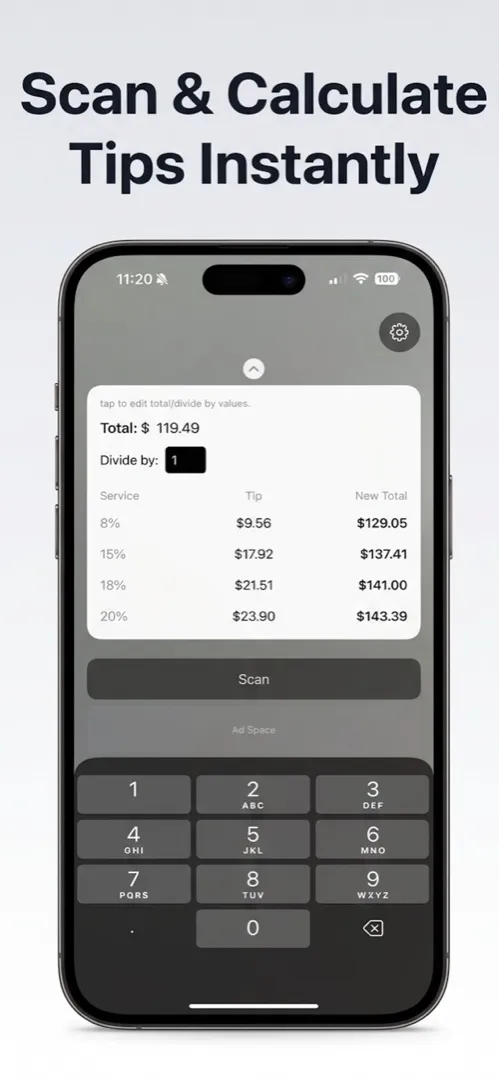
SnapTip is a free iPhone app that handles the whole process: scan the receipt, calculate the tip, and split the bill by person or item.
How it works
1. Scan the receipt.
Open SnapTip and point your camera at the receipt. The app reads the total and line items. No manual entry required.
2. Set the tip.
Choose a standard percentage (15%, 18%, 20%) or enter a custom amount. SnapTip calculates the exact tip and shows you the new total.
3. Split the bill.
Split evenly across the whole group, or assign items to specific people for a precise breakdown. Everyone sees exactly what they owe.
4. Done.
No mental math. No rounding arguments. No one feels like they got stuck paying for something they didn't order.
Common Scenarios SnapTip Handles
The Mixed Drinkers Table
Four people at dinner. Two ordered wine, two stuck with water. The wine was $50 for the bottle.
With SnapTip, the two wine drinkers have the bottle assigned to them. The other two pay for their food only. The tip applies to the full total. Everyone pays their share.
The Group Lunch Where One Person Needs a Receipt
When someone needs an itemized breakdown for expense reporting -- say, a business lunch -- SnapTip gives them exactly what they ordered, with their portion of the tip, ready to show. Need to scan and save that receipt as a PDF for your records? Scanory handles that part.
The Birthday Dinner
Everyone agrees to cover the birthday person's meal. SnapTip splits the honoree's items across the rest of the group automatically, so nobody has to figure out the math while dessert is being served.
The "I Only Had an Appetizer" Situation
Someone joined for drinks and an appetizer and is leaving early. SnapTip assigns just those items to them. They pay their share, tip on their portion, and leave without drama.
SnapTip vs. Other Options
| Option | Cost | How it works |
|---|---|---|
| SnapTip | Free | Scan receipt → tip → itemized split |
| Tippy | $0.99 | Basic tip calculator, manual entry |
| Calculator+ | Free (with limits) | General calculator, not tip-specific |
| Mental math | Free | Error-prone, slow, social stress |
| "Venmo me later" | Free | Usually results in someone forgetting |
The main advantage of SnapTip over a basic tip calculator: the receipt scan means you're working from actual numbers, not trying to remember what everyone ordered.
What About Just Using the Default Calculator?
The built-in calculator on iPhone can do the math, but you're doing all the work manually:
- Calculate the subtotal
- Multiply by tip percentage
- Divide by number of people
- Repeat for each person if splitting unevenly
That's four or more separate calculations, done while people are waiting and the server is hovering. SnapTip condenses it to a scan and a few taps. (For more free apps that solve everyday problems like this, see our 5 free iPhone apps you need in 2026 roundup.)
A Note on Privacy
SnapTip doesn't store your receipts or send them to any server. The scan happens on your device. Your meal history and spending data stay with you.
Frequently Asked Questions
Is SnapTip really free?
Yes. SnapTip is completely free — no subscription, no in-app purchases for core features. Receipt scanning, tip calculation, and bill splitting all work without paying anything.
Can SnapTip handle unequal splits where everyone ordered different things?
Absolutely. You can assign individual items to specific people so each person pays only for what they ordered, plus their share of the tip. No more subsidizing someone else's steak.
Does SnapTip store my receipt data?
No. SnapTip processes everything on your device. Your receipts and spending data are not uploaded to any server. Once you close the app, the scan data stays on your phone.
What tip percentages does SnapTip support?
SnapTip includes standard options like 15%, 18%, and 20%, and also lets you enter a custom tip amount or percentage. You can adjust it to match local tipping norms or your preference.
Download SnapTip
Dinner with friends shouldn't end in a math problem.
Download SnapTip from the App Store -- free, no subscription, works every time the bill arrives.
More Free Apps for Everyday Life
SnapTip is part of the SoSo Family -- a set of free iPhone apps designed to handle the small frictions of daily life.
If you're tracking what you eat (or what you burn) at the gym, FitnessLog is the best free workout tracker for iPhone — no subscription needed.
Other apps in the family:
- VoiceNote+ -- Free meeting transcription in 13 languages
- Scanory -- Document scanner, no watermarks, free
- Qrra -- QR code scanner and generator, free
All SoSo Family apps are free and built with your privacy in mind.