5 Free iPhone Apps You Actually Need in 2026
Let's be honest: "free" on the App Store usually means "free to download, then pay to actually use."
You install a workout tracker. Three routines max on the free plan. You try a document scanner. Watermarks on every PDF. A voice transcription app? 300 minutes per month, then $8.33/month for more.
The pattern is always the same. Download, try, hit a wall, pay or delete.
These five apps break that pattern. Every feature is free — no subscriptions, no feature gates. They're supported by ads, and three of them (VoiceNote+, FitnessLog and Qrra) offer a one-time purchase to remove the ads if you'd rather not see them. They're built by SoSo Family, a small team with a simple idea: everyday tools should just work, without charging you monthly for the privilege.
Here's what each one does, and why it's worth the space on your phone.
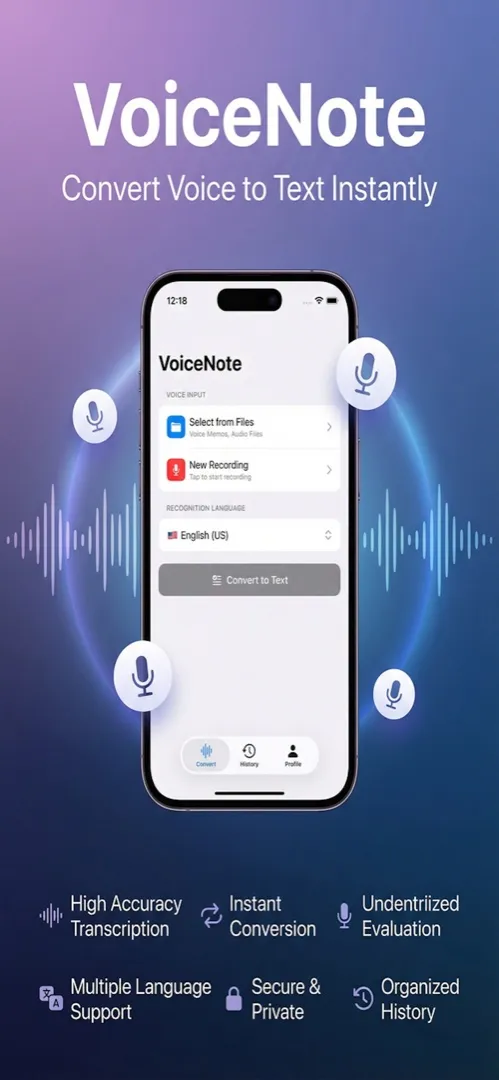
1. VoiceNote+ — Voice Transcription That's Actually Free
What it does: Records audio and converts it to text using AI — supporting 13 languages.
Most voice transcription apps charge for anything useful. Otter.ai gives you 300 minutes per month with a 30-minute cap per conversation on its free plan — then it's $8.33/month (see our detailed VoiceNote+ vs Otter.ai comparison). Rev is a paid service entirely. Apple's built-in voice memos don't transcribe at all.
VoiceNote+ gives you two transcription engines:
- Apple Online — fast, real-time transcription when you have internet
- OpenAI Whisper — offline, on-device processing with near-perfect accuracy (Large v3 model achieves ~97.9% accuracy)
That Whisper option is the standout. Your audio never leaves your device. No server, no account, no data collection. You download the model once, and transcription works anywhere — airplane mode, remote cabin, underground parking lot. Learn more about how offline Whisper transcription works on iPhone and which Whisper model is right for you.
Best for: Students recording lectures, professionals in free meeting transcription, journalists doing interview transcription, anyone who wants a free voice memo app without paying monthly.
2. FitnessLog — A Workout Tracker Without the Paywall
What it does: Logs sets, reps, and weight for any exercise. Tracks your progress over time.
The gym app market has a specific problem: nearly every popular tracker limits the free version in ways that make it useless for serious training.
- Strong caps you at 3 routines. If you run a 4-day split, you've already exceeded the limit.
- Hevy locks analytics and custom exercises behind $9.99/month.
- JEFIT runs ads during your workout and charges $12.99/month to remove them.
FitnessLog gives you unlimited routines, full set/rep/weight logging, and progress tracking — all free, with an optional one-time purchase to remove ads. You open it, log your workout, and close it. That's it. See how it stacks up in our best free workout tracker comparison.
Best for: Anyone who lifts weights, does bodyweight training, or follows any structured exercise program and wants to track progress without managing a subscription.
3. Scanory — Document Scanner Without Watermarks
What it does: Scans documents with your camera and saves them as organized PDFs.
Document scanning apps are notorious for bait-and-switch pricing:
- CamScanner stamps watermarks on your free-tier scans — and had a well-publicized privacy incident in the past.
- Adobe Scan limits OCR to 5 pages on the free plan, then charges $9.99/month.
- Apple Notes can scan, but organizing and managing PDFs is minimal at best.
Scanory scans documents cleanly, saves them as PDFs, and lets you organize everything into folders. No watermarks on any scan. No page limits. No subscription tier waiting to charge you. Read our best free document scanner comparison for a deeper look.
Best for: Students scanning lecture notes and handouts, freelancers digitizing receipts and invoices, anyone who needs to turn paper into PDF without paying Adobe prices.
4. Qrra — QR Codes, Both Ways
What it does: Scans QR codes and barcodes, and creates QR codes for links, Wi-Fi, contacts and more.
Your iPhone camera can scan QR codes. What it can't do is create them. And if you need a QR code for your business, event, or personal use, most apps charge for generation or put it behind a subscription.
- QR Reader shows ads during scanning and charges for the premium experience.
- Scan Me limits creation features on the free tier.
- iPhone Camera scans only — it can't create contact, email or SMS codes, and keeps no history.
Qrra handles both scanning and creating. Create QR codes for links, contact cards, Wi-Fi, text, email, phone, SMS and social profiles, then save them to Photos. Nothing is behind a subscription. The first 5 uses are ad-free; after that ads appear every other use, and a one-time Remove Ads turns them off. Check out our complete QR code scanner and generator guide for more details.
Best for: Small business owners creating QR codes for menus or promotions, event organizers, marketers, or anyone who needs to generate and share QR codes without paying for a subscription.
5. SnapTip — The Bill Splitter That Does More
What it does: Scans receipts, calculates tips, and splits costs between any number of people.
Tipping and bill-splitting apps are a small category, but the existing options still manage to disappoint:
- Tippy charges $0.99 upfront — not much, but it's the principle when the app does one simple calculation.
- Calculator+ is a general calculator with tip features bolted on as an afterthought.
- Mental math works until there are 8 people, 3 shared appetizers, and someone who didn't drink.
SnapTip combines receipt scanning with tip calculation and bill splitting. Point your camera at the receipt, set the tip percentage, enter the number of people, and you're done. No manual entry, no mental gymnastics. See our guide to splitting bills fairly on iPhone for tips and tricks.
Best for: Anyone who eats out with friends, splits household bills, or just wants a fast way to calculate tips without fumbling with a calculator app.
Why These Apps Are Free (And Stay Free)
A reasonable question. If every feature is free, what's the business model?
SoSo Family is a small team building tools they personally use. The goal is to create useful apps that people actually want on their phone — not to extract monthly revenue from basic functionality. All five apps are:
- Free to download and use — no subscriptions and no paywalled features. The apps show ads; VoiceNote+, FitnessLog and Qrra have a one-time Remove Ads purchase
- Privacy-focused — no accounts required, data stays on your device
- Rated Ages 4+ — clean, simple, appropriate for anyone
Ads pay for development, so the tools themselves never need a monthly fee.
The Full SoSo Family Lineup
| App | What It Does | Download |
|---|---|---|
| VoiceNote+ | AI voice transcription, 13 languages, offline mode | App Store |
| FitnessLog | Workout tracker, unlimited routines, progress history | App Store |
| Scanory | Document scanner, PDF, folder organization | App Store |
| Qrra | QR code & barcode scanner, QR generator | App Store |
| SnapTip | Receipt scanner, tip calculator, bill splitter | App Store |
| ReceiptZero | Receipt scanner with on-device OCR, tax-ready PDF/CSV export | App Store |
| Milesheet | Mileage log and expense receipts for self-employed drivers | App Store |
| Arrowly | Tap-away arrow puzzle, 300 offline levels | App Store |
| Hordeling | Seven-minute survivor run, one thumb | App Store |
The five above are the ones most people reach for. The rest cover narrower jobs — tax
receipts, mileage for drivers, and two games for the gaps between them.
Visit sosofamily.ca to learn more.
Frequently Asked Questions
Are these apps really free?
Yes. No subscriptions and no premium tiers — every feature is available from the moment you download. The only purchase is an optional one-time Remove Ads in VoiceNote+, FitnessLog and Qrra.
Do these apps have ads?
Yes. The apps are ad-supported — Scanory and SnapTip show a banner, VoiceNote+ and Qrra show an occasional full-screen ad, and FitnessLog shows ads too. VoiceNote+, FitnessLog and Qrra let you remove them with a one-time purchase.
Are these apps safe for my privacy?
Absolutely. None of the apps require you to create an account, and your data stays on your device. VoiceNote+'s Whisper engine processes audio entirely on-device — nothing is sent to a server. All five apps are rated Ages 4+ on the App Store.
Do I need to create an account to use them?
No. You can open any of these apps and start using them immediately. There's no sign-up, no email verification, and no login screen. Just download and go.
What iPhone do I need?
All five apps work on any iPhone running a recent version of iOS. VoiceNote+, FitnessLog, Qrra and Scanory need iOS 17 or later, and SnapTip needs iOS 15. For VoiceNote+'s larger Whisper models, a newer device (iPhone 12 or later) is recommended for faster processing.
One More Thing
If any of these apps help you out, a review on the App Store goes a long way for a small team. It takes 30 seconds and helps other people find tools that are actually free.
We're here to help.